Stop Copy-Pasting JWTs: Automate Postman Auth with Scripts
Every developer testing authenticated APIs knows the friction: hit the login endpoint, highlight the JWT in the response body, copy it, navigate to another request, and paste it into the Bearer token field. When the token expires ten minutes later, the dance starts over. Automating this loop takes two lines of JavaScript in Postman and eliminates manual token handling across your entire collection.
The Strategy: Capture Tokens in Postman Scripts
Postman executes scripts in the Tests tab immediately after receiving a response. By parsing the JSON response body and assigning the resulting access token to a collection-level variable, every subsequent request inside that collection can consume the token dynamically.
Step-by-Step Setup
Step 1: Extract and Save Token in the Login Request
Send your standard authentication request with your credentials in the request body:
{
  "email": "saman@gmail.com",
  "password": "your-secure-password"
}
Navigate to the Tests tab of that same login request and add the script to extract and persist the token:
// Parse the incoming JSON response
const responseBody = pm.response.json();

// Store the token into collection variables for reuse
pm.collectionVariables.set("access_token", responseBody.data.access_token);
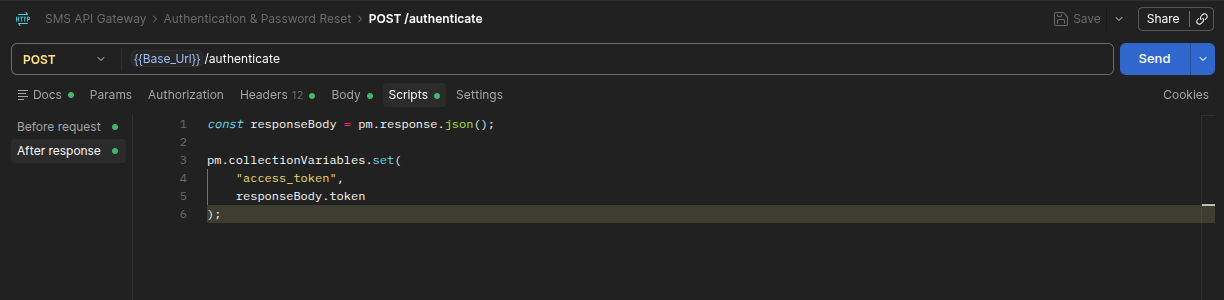
Whenever this request completes with a 200 OK, Postman extracts responseBody.data.access_token and updates the variable access_token across your collection.
Step 2: Inherit Auth at the Collection Level
Instead of setting the Bearer token on individual endpoints:
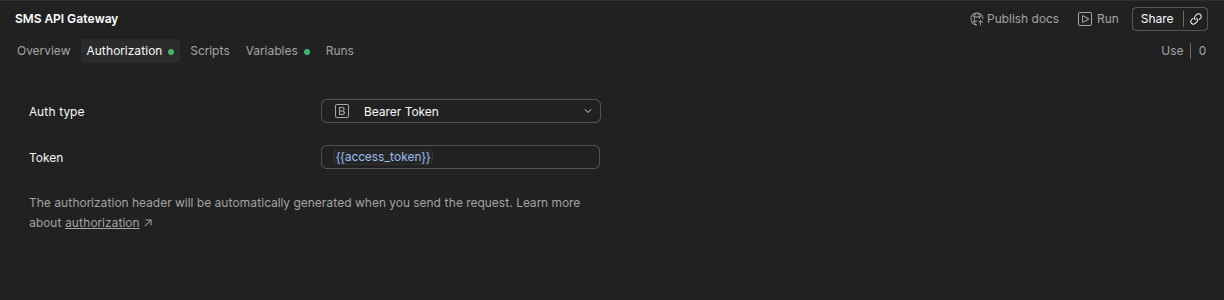
- Right-click your Postman collection.
- Open the Authorization tab.
- Set Type to Bearer Token.
- In the Token field, reference your stored variable using double braces:
{{access_token}}. - Ensure individual requests within the collection have their authorization set to Inherit auth from parent.
Now, running your login request once automatically authenticates every other endpoint in the suite.
Essential Best Practices
- Add defensive checks: Avoid unhandled exceptions if authentication fails by verifying the status code before reading nested keys:
if (pm.response.code === 200) {
  const responseBody = pm.response.json();
  pm.collectionVariables.set("access_token", responseBody.data.access_token);
}
- Scope variables intentionally: Use
pm.collectionVariablesfor shared suite workflows, orpm.environment.set()if switching between Local, Staging, and Production environments with different active tokens. - Never commit real credentials: Store test passwords and credentials in Postman environment variables marked as secret rather than hardcoding production passwords into saved request bodies.
Automating routine friction points keeps your focus where it belongs: testing endpoints, inspecting payloads, and building features without repetitive overhead.